
It’s already evening, you want to get out of the house, and you have no plan. So you open one app for food, another for bars, a third to check if anything is actually happening tonight, and by the time you’ve cross-checked all of them, the momentum is gone, and you’re back on the couch.
If you searched “what to do tonight in Phoenix” hoping for a real answer instead of another list of fifty restaurants, this is for you. Below is a simple way to go from “I’m bored” to “I’m walking out the door” in about five minutes, using a free app called Glimsp that puts everything happening around you on one live map.
First, Why Phoenix Is Hard to Plan For
Phoenix is big and spread out. Downtown, Roosevelt Row, Old Town Scottsdale, Tempe, and Arcadia each have their own scene, and the best spots aren’t always the ones that spent the most on ads. Most apps make you do the work: one tells you where to eat, another tells you what’s rated well, and none of them tell you what’s happening near you right now.
The result is decision fatigue before you’ve even left. What you actually want is one place that shows you what’s open, what’s close, and what’s worth your time tonight.
What Glimsp Is
Glimsp is a free discovery app that maps out what’s around you in a city: restaurants, shops, nightlife, and live events, all on one screen. Open it, choose Phoenix, and you land on a live map of the city where every pin is a real place you can go tonight. It’s available on both the App Store and Google Play, so you can set it up in a couple of minutes and start browsing.
Three things make it fast. You can filter by category with one tap (Restaurants, Shop, Nightlife). You can set a distance radius, so you only see places within, say, five miles. And you can switch between the map and a list view when you’d rather scroll through options than read pins. You can even see which venues are busy right now with Glimsp’s Live feature, so you’re not walking into an empty room.
How to Find Tonight’s Plans in Under 5 Minutes
Here’s the whole method, step by step. It works the same every night, so once you’ve done it once, it’s second nature. Here’s what it looks like in the app:
Step 1: Open the Glimsp app
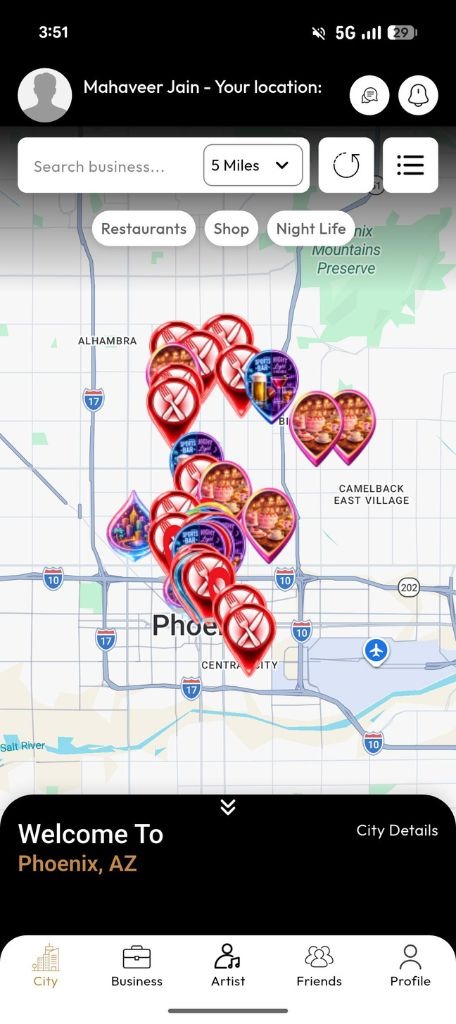
You land on a live map with pins across Downtown, Scottsdale, Tempe, and the rest of the valley. Every pin is a real place you can go tonight. Use the radius filter to keep things close (five miles is a good start), then tap a category (Restaurants, Shop, or Night Life) to narrow the map to what you’re in the mood for.
Step 2: Tap on the place you like
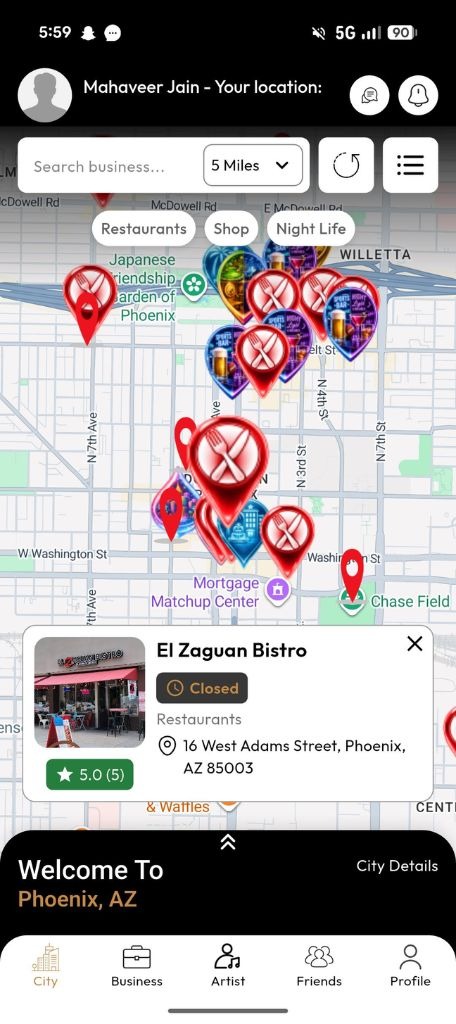
Tap on the location shown on the map of your choice. It will open up.
Step 3: Open a spot to see the details
Tap on any location like “El Zaguan Bistro” and view further in detail. Here you can see the general information of location, address, amenities, and payment methods they accept. Also, you can check out the highlights of the location and the opening hours of the place. You can read customer reviews to know what others experienced there.
Step 4: Get directions and go
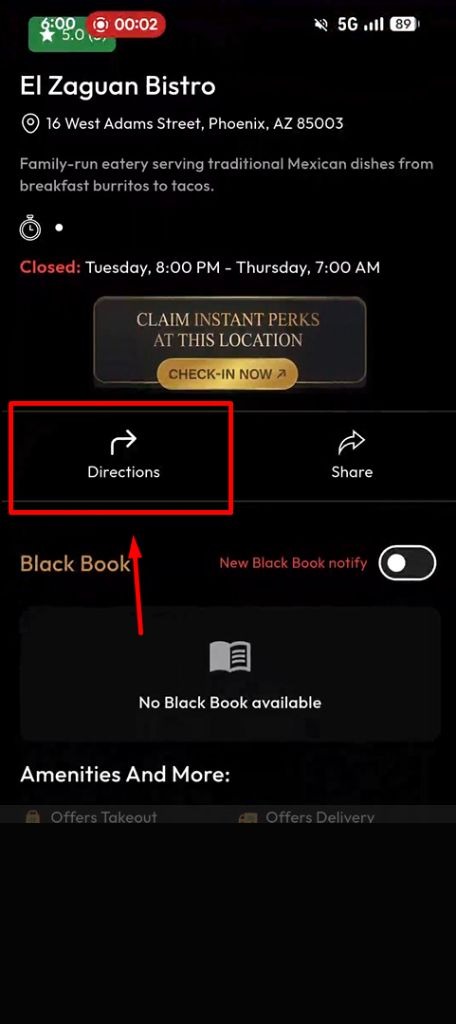
From that same screen you can get directions, share it with whoever you’re meeting, browse the photo gallery, and save it for next time. No five tabs, no guesswork.
It’s Not Just Bars: Catch Events Too
A night out isn’t only dinner and drinks. Glimsp surfaces live events as well, marked so you can spot them on the map and in the list. Alongside the usual venues you might see something like a fair at the Phoenix Fairgrounds, with its own listing, address, and hours.
Because events are time-sensitive, this is exactly the kind of thing worth checking in the app rather than on a page that was written weeks ago. The app shows what’s actually on while you’re looking.
Know Phoenix by Neighborhood
The map makes more sense when you know the character of each area, so you can point your search at the right part of town:
- Downtown and Roosevelt Row: walkable, artsy, and dense with bars, taprooms, and restaurants. Good when you want to park once and wander.
- Old Town Scottsdale: the nightlife core, later crowds and more energy.
- Tempe and Mill Ave: younger, student-heavy, casual and lively.
- Arcadia and Biltmore: patios and stronger dining, better for a lower-key night.
Once you know which area fits your mood, drop into that part of the map and let the pins do the rest.
Planning Phoenix From Out of Town
Here’s a bonus if you’re visiting: you don’t have to be in Phoenix to browse it. Open the app from anywhere and scope out the scene before you arrive, whether you’re flying in next week or just deciding if a trip is worth it. Same map, same detail pages, same event listings. It’s a genuinely useful way to plan ahead, not just a tonight tool.
Why This Beats Scrolling Five Apps
One live map instead of five tabs. Real detail pages instead of guesswork. A shortlist you can save so every future night is faster. And events and venues in the same place, so you don’t miss what’s happening while you decide where to eat. The whole point is to spend your energy on the night out, not on planning it.
Ready for Tonight?
The method is simple, and it works any evening: open Glimsp, choose Phoenix, set your distance, pick a vibe, and go. Download the app for free and find your spot for tonight.
- Download Glimsp for iPhone from App Store: https://apps.apple.com/us/app/glimsp-app/id6744325159
- Get it for Android from Google Play: https://play.google.com/store/apps/details?id=com.business.social.happening.glimspapp
Glimsp isn’t just for finding places to go. It’s also where local businesses connect with customers in real time. Claim your business on Glimsp for free and appear on the live map when people search for restaurants, bars, shops, nightlife, and events nearby. Share what’s happening at your venue, whether it’s live music, a packed crowd, a happy hour special, or a special event. When people can see the real atmosphere before they arrive, they’re more likely to choose your business.